
Healthcare staffing software
Keep your shifts, staff and credentials in one place.
Enginehire puts your ATS and CRM in one system built for healthcare staffing. Your staff use a branded app to pick up shifts and clock in.
Trusted by staffing agencies.



Explore Enginehire
What Enginehire does for a healthcare staffing agency
01 / THE SOFTWARE
01 / 05
Fill open shifts with smart matching
Enginehire suggests matches for open shifts based on factors like specialty and availability. Staff get shift alerts by text and push notification, and they can pick up shifts in your branded app. Dashboards show which shifts are still open and why.
02 / 05
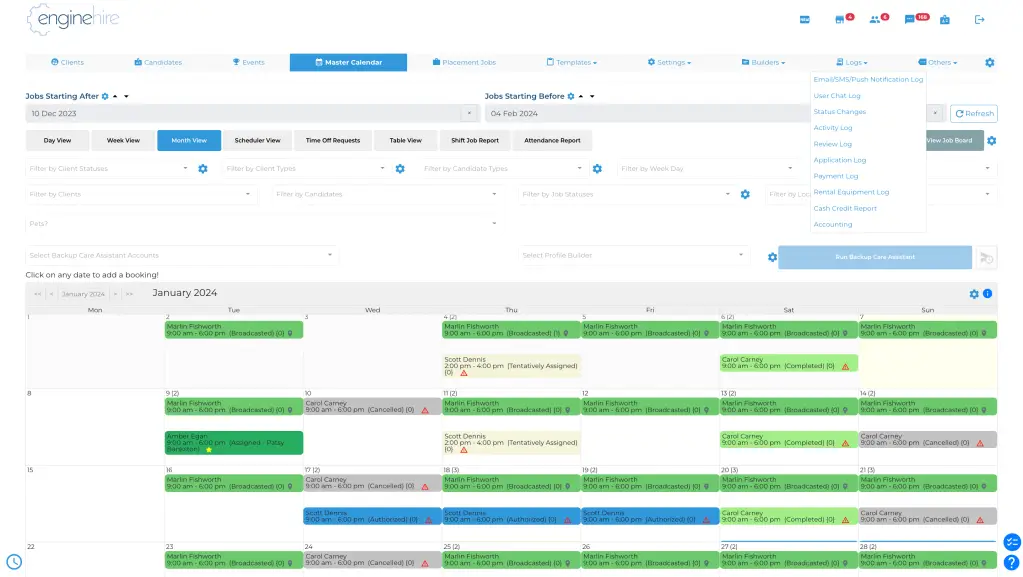
Schedule nurses and physicians in one place
You can manage complex schedules for nurses and physicians, including locum and per diem staff. Techs and therapists fit in the same schedule too.
Scheduling
Nurses and physicians
Locum and per diem staff
Techs and therapists
03 / 05
Track credentials and expiry dates
Enginehire tracks credentials and background checks for each person on your team. Alerts go out before something expires, so staff can update their own documents. You can also create audit reports when you need them.
Credentials
Credentials and checks
Expiry alerts
Updated documents
04 / 05
Send timesheets straight to payroll and billing
Staff clock in and out on their phones. Their timesheet data flows into payroll and invoicing, so your team does not copy hours between systems.
Timesheets
Clock in and out
Timesheet data
Payroll and billing
05 / 05
Give facilities a portal of their own
Clients get a branded portal where they can see job orders and staff schedules in real time. Enginehire can also connect to any VMS that your facilities use.
Facility portal
Job orders
Staff schedules
Your client portal
See the workflow
Follow the work from credentials to payroll.
Choose a step to see how it works.
01 / 04
Keep credentials in view.
Enginehire tracks credentials and background checks for each person on your team. Alerts go out before something expires.
Credentials
Credentials and checks
Expiry alerts
Updated documents
02 / 04
Find staff for an open shift.
Enginehire suggests matches for open shifts based on factors like specialty and availability.
Matching
Open shift
Specialty and availability
Suggested matches
03 / 04
Let staff pick up shifts in the app.
Staff get shift alerts by text and push notification, and they can pick up shifts in your branded app.
Shift app
Shift alert
Your branded app
Staff accept a shift
04 / 04
Carry hours through to billing.
Staff clock in and out on their phones. Their timesheet data flows into payroll and invoicing.
Timesheets
Clock in and out
Timesheet data
Payroll and billing
What customers say.

“It has been great getting set up and learning the platform and what it can do.”
Operations Manager
Hospital & Health Care
April 4, 2024
“Their customer support is top-notch, always responsive and ready to help.”
CEO
August 23, 2024
“It has made the running of my business easier, quicker, and more professional. The clients love it as well!”
Founder and CEO
Individual & Family Services
November 14, 2023
“They are quick to respond, so helpful, love the assistance when setting it up. Great company!”
Doula & Nanny Agency
Individual & Family Services
October 17, 2023
“I love that everything is in one system. It helps to cut down on time and customer service is amazing!”
Owner
Staffing & Recruiting
November 14, 2023
Support from the start
You have help as you get started.
A dedicated onboarding manager
Every agency has a dedicated onboarding manager.
Help with your data move
The Enginehire team helps you transfer your data from your current system.
Live support and tutorials
You can reach live support nearly 24/7, and you can use the tutorials and lessons at any time.
Ask about your current system and the way your agency works.
Your demo
How the demo works
01
Fill in the short form.
It asks for your name and email, plus a few details about your agency.
02
Pick a time on the calendar.
Choose a time and enter your details on Enginehire’s booking page.
03
Join the call.
We walk you step by step through the process your staff and your clients would follow in your system. We also show you the tools you would use to manage and automate the work.
Before your demo
Frequently asked questions
I am starting a new healthcare staffing agency. Can I use Enginehire?
Yes. Enginehire works with new agencies as well as established ones, and every agency has a dedicated onboarding manager.
Which roles can I schedule?
You can schedule nurses and physicians, including locums and per diems. Enginehire also covers allied health and long-term care staff.
What support do I get?
Every agency has a dedicated onboarding manager. You can reach live support nearly 24/7, and you can use the tutorials and lessons at any time.
Can I move my data from another system?
Yes. The Enginehire team helps you transfer your data from your current system.
Which background check tools does Enginehire connect to?
Enginehire lists integrations with Veremark and TruDiligence. You can ask for the full list of integrations on your demo.
See how Enginehire would run your shifts
Book a demo, and we will walk you through scheduling and credentials step by step.
Book a demo